Showing posts with label email marketing tools. Show all posts

Wednesday, May 2, 2018

The Best Tool to Plan Your Email Marketing Automation


Imagine this: Your best marketing content is delivered automatically to your audience at the perfect time. You don’t need to lift a finger. You watch revenue flow into your bank account. Your business grows. You optimize your automation. More revenue flows into your bank account each month. Now, you’re saving hours and making more money . . . and it’s automatic. That’s the power of marketing automation. However, there’s one hurdle which often prevents people from using automation –– the fear that it’ll be too difficult to get started. In fact, 50% of marketers think it’s difficult to implement marketing automation, according to the market research firms Three Deep and Ascend 2. After all, automation can get pretty complex. But, there’s a tool that can make it much more simple –– an automation map.

What is an automation map?


An automation map is a visual representation of your automation flow. Just like a map, it can give you direction, and help you plan ahead and avoid missteps as you create an automated series. Email automation can have a lot of moving pieces. Your automation map will help you take all of that into account and plan ahead. Plus, you can build upon your map as you add more emails and complexity to your automation. 


They help us review the flow and content of simple series and plan every step of complex, branching automation series. By glancing at an automation map, I can quickly see whether or not my email automation leads subscribers all the way through the marketing funnel. I can determine whether or not my series contains dead ends. And I can see if I’m segmenting my audience in the best way possible. Whether you’re just getting started with automation or an expert, an automation map can provide guidance and level up your efforts.

How to map your series


Before you start mapping, you should decide what tools you’d like to use to map your series. I recommend either hand drawing your series with a pencil and paper or planning your series out digitally with a tool like Google Draw. Which you choose all depends on your preferences. Once you’ve chosen your preferred tool, you’re ready to map your series. Every automation map is comprised of 4 simple elements:

1. The emails in the series


You might have a 4-email automation series or a 20-email automation series. Either way, the goal of the emails within your series is to lead your subscribers through the marketing funnel or persuade them to take a certain action. You can review your automation map to see if your content and emails will accomplish this.

2. Time delays between those emails


Whether it’s minutes, hours, days, or weeks, you should include a time delay between nearly every email. Time delays will deliver your emails at the perfect time, rather than all at once. So, what is the perfect time? That depends on your audience and the expectations you set on your sign up form and welcome email. If you’re unsure, survey your audience to ask them what they prefer. Or, test different time delays to see what works best for your audience.

3. Tags or labels you’ll use to segment your subscribers


Most email marketing and automation platforms can apply tags or labels to your subscribers when they perform certain actions, receive an email, or subscribe to a list. These tags can help you segment your audience into groups based off their tags. You can then send automated emails to those groups specifically. For example, let’s say you set up your email marketing platform to apply a tag to a subscriber when they click on a survey link in one of your automated emails. You could then resend the survey email to anyone who does not have that tag. That way, you could give non-responders another chance to answer your survey without sending an irrelevant email to those who already responded to your survey.

4. The various paths or journeys your subscribers might take


Action-based or behavioral email automation is when you send automated emails to people based off their actions. If you’re using action-based automation in your automated series, your subscribers will go down different paths or journeys depending on what they do. A subscriber who clicks one email may receive another email targeted to them. While a subscriber who opens a different email, may receive a 3-part email series based off that open. Your automation map should outline the different paths your subscriber could possibly take. This way, you can avoid sending too many emails to the same subscriber on the same day. And, you can preview your subscriber’s possible experiences. An automation map becomes extremely important when you start using action-based automation. You might think you have a brilliant idea for an action-based automation series. But, once you map it out, you might discover it would lead to a terrible experience for a particular segment of subscribers –– like getting 3 emails on one day.

An automation map in action


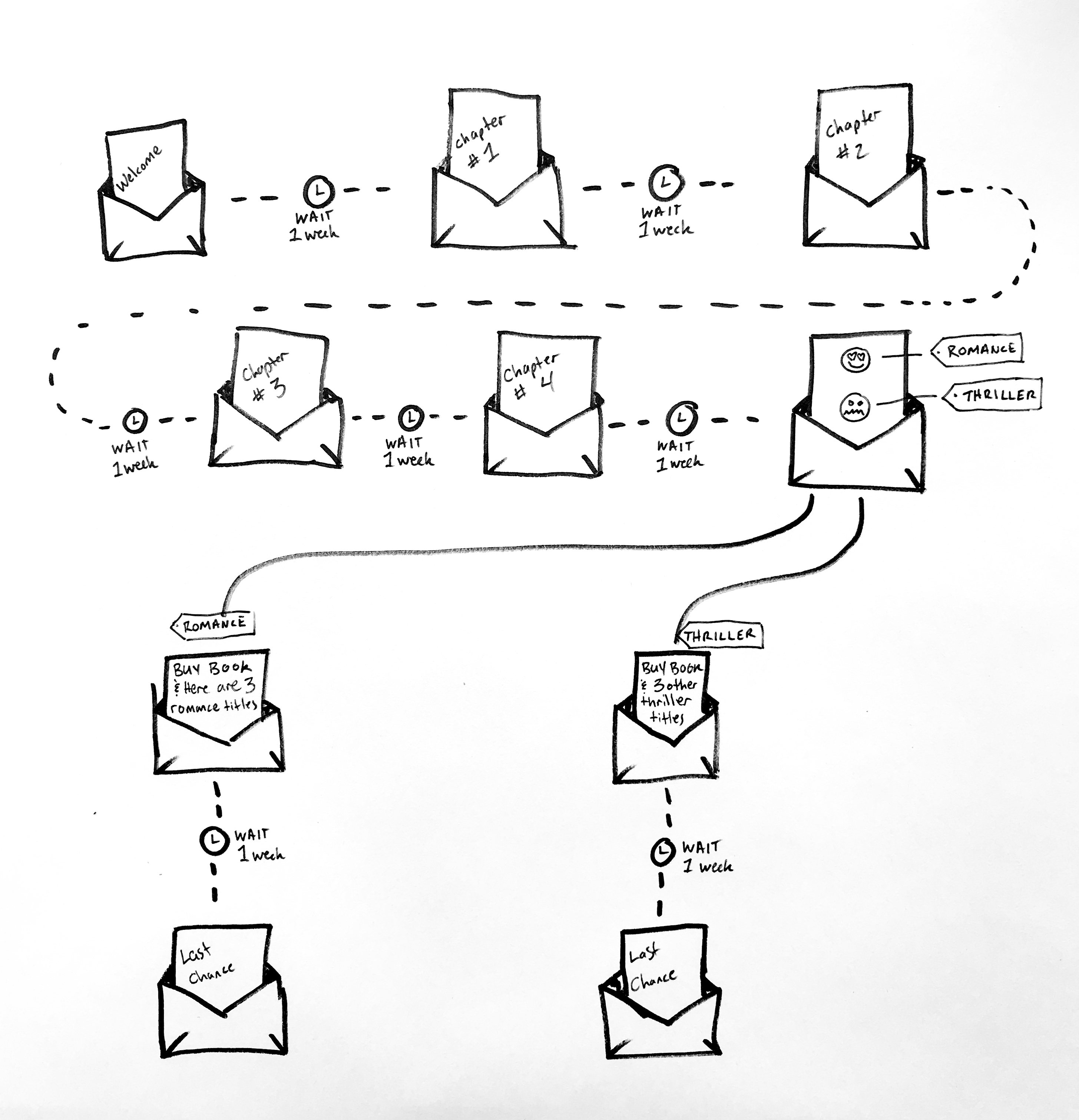
To help you see how automation maps work, we’re going to look at an example. Let’s say you’re an author who wants to promote his brand-new novel through automation. You decide to send a chapter every week for four weeks to your subscribers. At the end of the four-week automated campaign, you’ll promote a link to buy your entire novel. If you were hand drawing it, your automation flow might be mapped out something like this:


The same automation map created in Google Draw might look like this:


Pretty simple, right? But with this map, you know exactly what your time delays are, and you know exactly which emails will launch and to whom they’ll send. Now, let’s say you want to take it a step further with action-based automation. You’ll still offer your novel for purchase after you sends the fourth chapter, but you’ll also ask a question of your audience. Which genre do they prefer? Romance or Thriller. Depending on which option the subscriber clicks on, they are automatically tagged with either “Romance” or “Thriller.” You’ve now segmented your audience into two groups, and you can target those segments with his other book titles that fall in those particular genres. You could then send 2 different automated series to those segments. For those who chose “Romance,” you could ask them to buy your new romance book. For those who chose “Thriller,” you can promote your new thriller book. Here’s an example of what your automation map might look like for this action-based series:


As you map your own series, ask yourself these questions:


Should you apply a tag at the beginning and/or end of your series? (Doing so can help you identify who is currently within a series and who has finished a series.)


What’s the right time delay between each email? Am I sending too many emails? Am I sending too few?


Which emails slot into the different stages of the marketing funnel (awareness, consideration, conversion, loyalty, and advocacy)?


Is there an email I can add to the series that’ll make my user more likely to convert?


Not sure what to write in your automated emails? This free course will help.

Before you can launch an automated series, you need to write your emails. If you have writer’s block or need direction, our free “What to Write in Your Emails” course can help.


Source: https://www.business2community.com


ABOUT WNFP
Westchester Networking for Professionals (WNFP) is a business organization focused on providing our members and guests with an extraordinary networking experience, bringing business professionals together for the sole purpose of generating new relationships and developing new business opportunities. Not a member, learn how you can become a member and join this awesome group of professionals to connect and grow your business.

Stay Connected with WNFP!
Join WNFP Communities!

Tuesday, October 18, 2016

4 Email Tools That Genuinely Save Me an Hour Per Day

I'm sure you agree that time is the most precious commodity that none of us can afford to waste. In business, as in life, mastering time management is incredibly important.

Clogged and cluttered inboxes drain valuable time and distract you from focusing on what really matters: your work.

I've recently tried and tested a number of email tools and techniques in a bid to reclaim valuable time from my working day. As a result, I've genuinely been able to save an hour each day from tedious admin tasks and put that time to much better use.

If you save an hour a day for an entire working year, you could reclaim 261 hours of your time. That's over ten full days a year.

There are pros and cons to every email software, There are undoubtedly others options out there not listed here; however these four have made a dramatic difference in my efficiency, productivity and time management:

1. SaneBox
Sanebox is great for a number of reasons. First, it helps me filter out spam, junk, and even downgrades unimportant emails to be looked at later on. Not only that, but it automatically organizes emails into different folders which you can create and customize.

These specific features allow you to spend time where it counts, so you can tailor the software to suit your personal needs. I like it because I get reminders to chase sent emails and I can delay responses to lesser important emails. The more you use the software, the more it "understands" how you personally like to use email.

The only downside of the service? It does generate a few emails itself, which might feel counter-intuitive. You do have to pay, as well. However, for sanity, peace of mind and a clear, clutter-free inbox, I personally find the investment well worth it!

2. Calendly
Everyone can appreciate that organizing and scheduling calendar events is an extremely time-draining task. Calendly helps save you from those annoying back and forth email chains between clients and colleagues. The amount of time I've spent opening five calendars at once to look for a mutually suitable time for a meeting is mind-boggling!

Calendly is simple, yet effective. First, you sync your existing calendars directly into Calendly itself. This tool takes the pressure off your back by giving clients, colleagues and any recipients the ability to book convenient times directly into your diary. This doesn't mean anyone can see who you're meeting and when; rather, it keeps your schedule private by only showing available meeting times (which you can customize and edit). The settings are very flexible and intuitive to use.

I use this specifically for scheduling routine events such as podcast or editorial interviews and time for my internal team to book regular huddles or catch-ups but you can use this for anyone.

3. Boomerang
Boomerang (just for Gmail) is similar to SaneBox, in that it offers you the ability to delay sending emails. However, there's one feature in particular called 'Respondable' that really makes this tool stand out: an artificial intelligence assistant. Yes, you read that right! The AI software is super smart, and can be used to help you craft the perfect email by "grading" what you've written.

Why waste time writing emails that aren't getting a reply? With Boomerang, you're more likely to get responses from prospects, and you'll learn how to write better, more actionable emails in real time. The AI tool collates data from millions of messages, and works really well alongside Boomerang's traditional email productivity software.

4. x.ai
X.ai is my personal favorite. It's a full artificial intelligence software called "Amy", and she acts as your personal assistant to take the hassle out of scheduling meetings - It's pretty cool. All you need to do is CC: amy@x.ai into an email that you've received or want to send.

She then emails your client, colleague or prospect to find the best time and location, knowing your schedule and preferences. The best part? Once you CC Amy and ask her to take control, you can literally just sit back and wait for the meeting date to arrive in your inbox even if there's multiple people involved etc.

She does the same thing for meetings, calls, reminders and any other admin task that eats up your time. If you want to sign up today, there is a slight hitch - due to popular demand, there's a waiting list for the free version that can take a few weeks to process (you can pay to jump the queue if you're not the patient type!). In my humble opinion, this is a glimpse into the future.

So that's how I save an hour every day. What's your best time saving tip? I'd love to hear from you.

http://conta.cc/1nUbaWJ


Source: http://www.inc.com
Photo Credit: Getty Images


ABOUT WNFP
Westchester Networking for Professionals (WNFP) is a business networking association dedicated to helping small businesses and entrepreneurs develop, expand and grow. We offer affordable opportunities to help create a positive impact and advancement in your business interests and personal quality of life to take you to the next level.
Stay Connected with WNFP!
Join WNFP Communities!
Business blogs
Business Blogs - Blog Rankings